
Start With Court Filing Procedures Training That Builds Real-World Skills
Court filing procedures training teaches you how to prepare, submit, track, and correct filings through court e-filing systems. For aspiring paralegals and legal support staff, it is a practical skill that supports daily casework in law firms, from opening a new matter to filing motions, discovery documents, and supporting exhibits.
A quick overview:
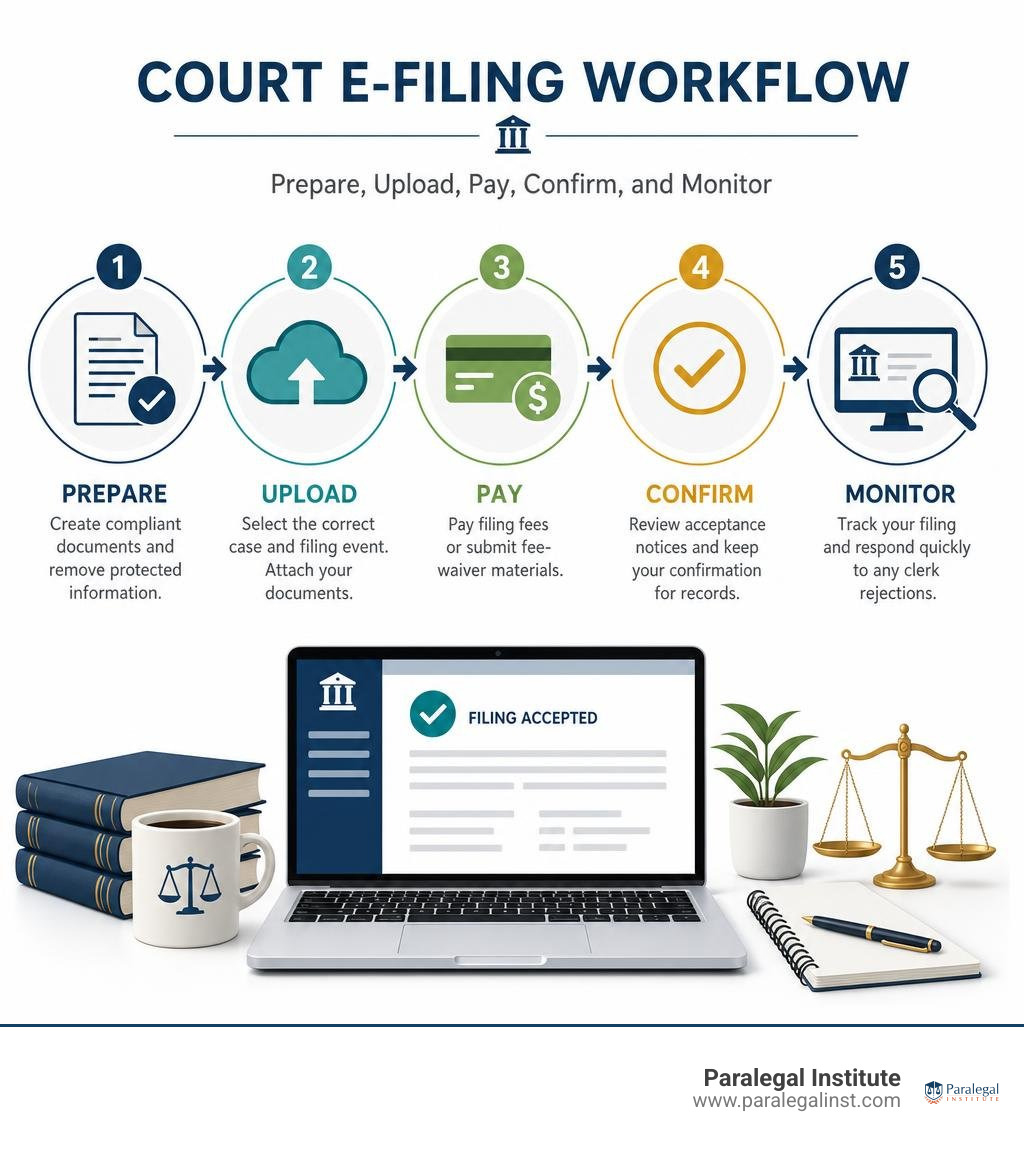
- Learn the court's e-filing platform, which may be a federal CM/ECF system or a state court portal.
- Prepare compliant, searchable PDF documents and remove protected personal information.
- Select the correct case, filing event, and document attachments.
- Pay required filing fees or submit the proper fee-waiver materials.
- Confirm acceptance, review notices, and respond promptly if the clerk rejects a filing.
Courts commonly offer self-paced tutorials, manuals, training databases, videos, FAQs, and live webinars. Training may differ by role: attorneys, support staff, and self-represented litigants often have different accounts, permissions, and filing rules. The details vary by court, but accuracy matters everywhere because a wrong docket event, missed attachment, or rejected filing can delay a case.
I am Matthew Pfau, a practicing U.S. attorney who teaches paralegal courses at Paralegal Institute and has trained and worked with paralegals in law-firm practice. My experience with court filing procedures training focuses on helping future legal professionals build the careful, job-ready filing habits that modern legal work demands.
Types of Court Filing Procedures Training
Navigating state and federal court systems requires understanding that no single electronic portal handles every legal filing. Court systems across the country utilize different platforms designed for their specific procedural rules. Federal district and appellate courts rely on the Case Management/Electronic Case Files (CM/ECF) platform, while state courts employ distinct software suites such as File & Serve, JEFS, or NYSCEF.
Comprehensive Court Filing Procedures education introduces legal professionals to these distinct portals. Modern legal practice demands that support staff switch seamlessly between federal and state jurisdictions. A key feature offered by most court platforms is a dedicated practice environment—often called a sandbox or training database. This practice database allows legal assistants and paralegals to execute test filings, practice docket selection, and upload sample pleadings without impacting live judicial records.
Online Tutorials and Manuals for Court Filing Procedures Training
Self-paced learning tools form the backbone of routine clerk's office instruction. Web portals host user manuals, downloadable PDF checklists, and on-demand video modules that walk filers through step-by-step submission processes.
For example, specialized court resources such as NYSCEF Training Resources offer instructional video libraries ranging from brief system overviews to extensive modules focused on complex civil litigation and emergency applications. Legal support staff can review downloadable user guides to understand system navigation before ever logging into an active clerk portal. Pairing these official materials with structured Legal Support Staff Training ensures that entry-level professionals build confidence and technical competence when handling formal court dockets.
Role-Based Options for Court Filing Procedures Training
Electronic filing portals assign distinct user roles and permission levels depending on who is logging into the system:
- Attorneys of Record: Counsel holds full filing authorization, receives Notice of Electronic Filing (NEF) emails, and maintains responsibility for all legal pleadings bearing their electronic signature.
- Paralegals and Legal Support Staff: Support staff typically log in under firm administrator privileges or designated staff accounts to draft dockets, upload attachments, and queue filings for attorney review.
- Pro Se / Self-Represented Litigants: Public filers generally utilize streamlined portals with specialized tutorials, as seen in federal resources like ECF Training | U.S District Court, where self-represented individuals must follow specific guidelines before receiving digital authorization.
Understanding these role-based distinctions helps legal teams delegate casework efficiently while protecting account credentials and court security compliance.
Essential Core Features and System Prerequisites

Before attempting any live electronic court filing, legal staff must master the foundational features of court management portals and meet strict technical prerequisites. Filing a legal document is not simply attaching a file to an email; it requires exact administrative formatting, metadata checks, and systematic data entry. Completing Hands-On Legal Training prepares students to navigate these technical standards without stumbling over administrative errors.
Case Initiation and Document Upload Standards
Initiating a new civil case electronically requires high precision. Filers must enter case party details, select the appropriate cause of action, enter statistical codes, and upload primary pleadings alongside civil cover sheets and summonses.
When preparing court uploads, standard document preparation rules must be enforced:
- Text Searchable PDF Standard: Courts generally require documents saved in PDF or PDF-A format. Scanned paper documents must undergo Optical Character Recognition (OCR) to allow full text searching by judges and opposing counsel.
- Strict Redaction Requirements: Personal Identifying Information (PII)—including social security numbers, birth dates, financial account numbers, and names of minor children—must be redacted prior to upload, in compliance with federal and state privacy statutes.
- Document Attachment Categorization: Lead documents (such as a Motion) must be uploaded separately from supporting attachments (such as Exhibits, Declarations, or Proposed Orders), with each attachment clearly named on the court docket index.
Official reference documents, such as the JEFS Judiciary Electronic Filing and Service System User Manual, illustrate how rigid these data fields and file formatting rules are across modern judicial systems. Detailed instruction in Evidence Management for Paralegal Success further reinforces how to properly organize, label, and redact documentary evidence before submitting files to an official docket.
Payment Processing and Post-Filing Support
Electronic court portals process statutory filing fees directly during document submission. Portal integrations connect to secure government payment portals like Pay.gov or establish pre-funded electronic wallet accounts (such as TOGA wallets) to collect motion fees, civil complaint initiation charges, or jury demand deposits.
Technical system compatibility is equally critical during setup:
- Web Browser Selection: Courts frequently recommend specific web browsers—such as Google Chrome, Mozilla Firefox, or Microsoft Edge—for administrative setup. Certain platforms explicitly advise against using Apple Safari when establishing payment accounts due to script handling limitations.
- Hardware Requirements: Filing workstations perform best with modern multi-core processors, ample RAM, and high-resolution monitors to view side-by-side legal documents and portal data fields.
- Clerk Help Desk & Post-Filing Corrections: State court portals, such as those indexed on File & Serve Training and Resources | North Carolina Judicial Branch, provide dedicated help desks and detailed FAQs. If a clerk rejects a filing due to an incorrect filing code or missing fee, staff must follow designated court procedures to resubmit or correct the entry without forfeiting critical filing deadlines.

How to Register for Court Filing Training
Registering for court filing sessions typically takes place through official judicial branch portals. Courts host periodic live webinars, monthly online classes via platforms like Microsoft Teams, and self-paced video libraries.
These instructional programs provide deep procedural insights into local rules, state-specific civil practice, and digital docket management.
To register for official court instruction:
- Visit the relevant court's education page.
- Select your role (Attorney, Law Firm Administrator, or Legal Assistant).
- Complete the online registration form to receive secure webinar login credentials.
Frequently Asked Questions About E-Filing
| Feature / Requirement | Federal CM/ECF System | State Court E-Filing Portals |
|---|---|---|
| Primary Platform | CM/ECF / PACER | File & Serve, NYSCEF, JEFS, Local Portals |
| Document Format | Searchable PDF / PDF-A | PDF / Searchable Text PDF |
| Payment Gateway | Pay.gov Integration | Direct Credit Card / Pre-funded Electronic Wallets |
| User Roles | Attorney Bar Login, Staff / Pro Se | Firm Administrator, Individual Staff, Self-Represented |
| Practice Environment | Federal Training Database / Sandbox | State Practice Modules & On-Demand Video Guides |
Are official court filing training sessions free to attend?
Most routine administrative training sessions provided directly by court clerk offices or court resource centers are free instructional services. Courts host these modules to help legal support staff and filers master local civil procedures, filing mechanics, and portal navigation.
What technical hardware and browser settings are required?
Most court electronic systems require a stable internet connection, an updated web browser (such as Chrome, Firefox, or Edge), PDF editing software capable of OCR text processing, and screen resolutions of 1920x1080 for optimal multi-window viewing. Filers should take note of browser warnings; for instance, creating electronic fee payment wallets on certain platforms should be done using desktop PC browsers rather than mobile or Safari configurations to prevent payment script errors.
How do law firms manage user access and support staff roles?
Law firms usually appoint a Firm Administrator within the court portal. The Firm Administrator establishes a master firm account, invites individual attorneys and paralegals via email, assigns appropriate user permissions, and maintains active payment accounts. As multi-factor authentication (MFA) becomes standard across judicial platforms, administrators must ensure that support staff credentials remain secure and compliant with administrative court orders. Enrolling support staff in structured Legal Office Training ensures that every team member understands administrative security protocols and proper case management procedures.
Conclusion

Mastering electronic court filing is an indispensable skill for anyone entering the legal profession. From selecting the correct docket event to redacting confidential records and managing payment processing, accurate court filing ensures that legal proceedings move forward without unnecessary administrative delays.
At the Paralegal Institute, we prepare students for the realities of modern law practice through an accelerated 15-week paralegal certificate program. Taught by practicing attorneys, our practical, hands-on curriculum equips you with real-world skills that make you career-ready from day one. We offer flexible options to fit your schedule: live online instruction that brings real-time classroom engagement directly to your home, as well as focused in-person classes at our Las Vegas location.
If you are ready to launch a rewarding legal career on a fast, practical path, explore our program options today and discover how our comprehensive curriculum fulfills key Paralegal Training Requirements.